
Uncategorized
How to Power On a Hidden Hills Vape: A Quick Guide
Jun
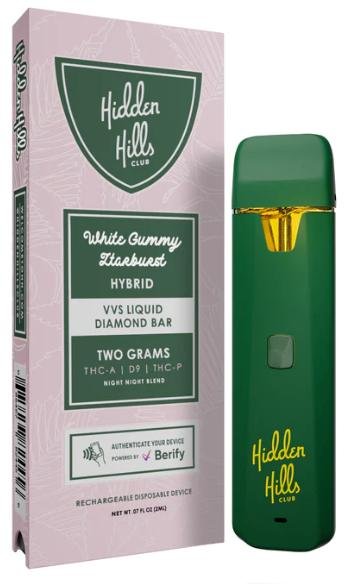
If you’ve just unpacked your Hidden Hills vape and you’re unsure how to get started, understanding the basic device controls can make setup simpler and help avoid common mistakes. Different vape models may vary slightly, so checking the packaging or official instructions for your specific device is always the best first step.
Check Whether Your Hidden Hills Vape Is Disposable or Rechargeable
Before trying to turn the device on, identify which type you have:
- Disposable vape: Typically arrives ready to use and may activate automatically when inhaling.
- Rechargeable vape: Often includes a charging port and may use button controls depending on the model.
Knowing the device type helps avoid unnecessary button pressing or charging attempts.
Look for a Power Button
Some vape devices include a small power button. A common pattern across many devices is:
- Press the power button multiple times in quick succession to toggle power mode.
- Watch for signs such as:
- LED light turning on
- Brief vibration
- Screen activation (if included)
If there’s no visible button, your device may be draw-activated instead.
Try Draw Activation
Many modern vape devices activate automatically.
To check:
- Confirm the device is charged if applicable.
- Remove any protective caps or seals.
- Take a gentle inhale through the mouthpiece.
- Look for indicator lights or device response.
If nothing happens, avoid repeated forceful inhalation.
Charge the Device if Needed
If the device appears inactive:
- Connect only with the recommended charging cable.
- Allow time for the battery to gain enough charge before testing.
- Disconnect once charged according to the manufacturer’s guidance.
Charging indicators often include blinking or solid lights.
Common Reasons a Vape Device Won’t Turn On
If your Hidden Hills vape still isn’t responding, consider these possibilities:
Protective Packaging Still Attached
Some devices include airflow plugs, stickers, or mouthpiece covers.
Battery Is Empty
Rechargeable models may need charging before first use.
Device Lock Feature Enabled
Some models include lock modes that prevent activation.
Connection Issue
For rechargeable devices, inspect charging ports for visible dust or obstruction.
Safety and Best Practices
To keep your device functioning properly:
- Follow local laws and age requirements.
- Store away from heat and direct sunlight.
- Keep away from children and pets.
- Avoid opening, modifying, puncturing, or attempting repairs.
Final Thoughts
Turning on a Hidden Hills vape is usually straightforward once you identify whether it uses button activation or automatic draw activation. Start by checking the device type, confirming battery status, and reviewing any included instructions. If the device still doesn’t respond, contact the manufacturer or retailer for support rather than forcing operation.
This guide is designed to help with device setup, troubleshooting, vape activation basics, and general user guidance so you can understand the hardware safely and efficiently.
