
Uncategorized
How to Charge Alibarbar Vape Ingot 9000
Jun
Introduction
The Alibarbar Ingot 9000 vape is one of the most popular disposable vaping devices known for its long-lasting performance, high puff count, and rechargeable capability. Unlike traditional single-use disposables, this model comes with a built-in battery that can be recharged via USB-C, allowing users to get the most out of the e-liquid before disposal.
If you are wondering how to charge Alibarbar Ingot 9000 safely and correctly, this guide will walk you through the full process step by step.
Does Alibarbar Ingot 9000 Need Charging?
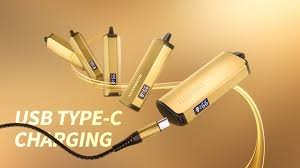
Yes — the Alibarbar Ingot 9000 is designed with a rechargeable internal battery. Even though it is a disposable vape, it includes a USB-C charging port so you can recharge it when the battery runs low.
Common signs that your vape needs charging include:
- Weak vapour production
- LED light flashing during use
- Device not activating properly
- Reduced flavour intensity
When you notice these signs, it’s time to recharge your device.
Where Is the Charging Port?
The charging port is usually located at the bottom or side of the device. It is a small USB-C port, sometimes covered with a rubber seal to protect it from dust and liquid.
Make sure to gently open the cover (if present) before inserting the cable.
How to Charge Alibarbar Ingot 9000 (Step-by-Step)
Follow these simple steps for safe and effective charging:
Step 1: Use the Right Cable
Use a USB-C cable (the same type used for many modern Android phones). Avoid forcing or using damaged cables.
Step 2: Connect to a Safe Power Source
Plug the USB end into a low-power source, such as:
- Laptop USB port
- Standard 5V wall adapter
- Power bank
Avoid fast chargers or high-wattage adapters, as they may overheat the device.
Step 3: Plug Into the Device
Insert the USB-C connector into the vape’s charging port gently. Do not apply force.
Step 4: Watch the Indicator Light
Most Alibarbar devices will show a LED indicator:
- Light ON or blinking = charging
- Light OFF or change in color = fully charged
Step 5: Disconnect After Charging
Once fully charged (usually 30–60 minutes), unplug the device immediately to avoid overcharging.
How Long Does It Take to Charge?
On average, the Alibarbar Ingot 9000 vape takes around:
- 30 to 60 minutes for a full charge
- Short charging sessions are enough for partial top-ups
Avoid leaving it plugged in overnight for safety and battery health.
Safety Tips for Charging
To ensure safe usage and longer device life, follow these important tips:
- Never use the vape while charging
- Avoid charging in hot or humid environments
- Do not use damaged cables or adapters
- Keep the charging port clean and dry
- Do not attempt to open or modify the device
Proper handling helps maintain performance and reduces safety risks.
Final Thoughts
Charging the Alibarbar Ingot 9000 vape is simple when done correctly. With a built-in USB-C rechargeable battery, you can enjoy extended usage without worrying about the device dying too quickly.
By following the correct charging steps, using safe power sources, and avoiding overcharging, you can maximize performance and ensure a smooth vaping experience every time.
